
Pictures drive the photo-based platform Instagram. Solid eye-catching photos must grab your audience’s attention so Instagram provides various filters to improve contributors’ pictures. But when doing a comparison post (before vs after), agencies should consider the lightening of the picture before posting to enhance picture visibility (not photoshopping).
Compare the two before/after photos of the airport terminal. This picture of the after-construction terminal looks ominous, dark, and maybe not as friendly as it should, especially for an “after” construction picture.
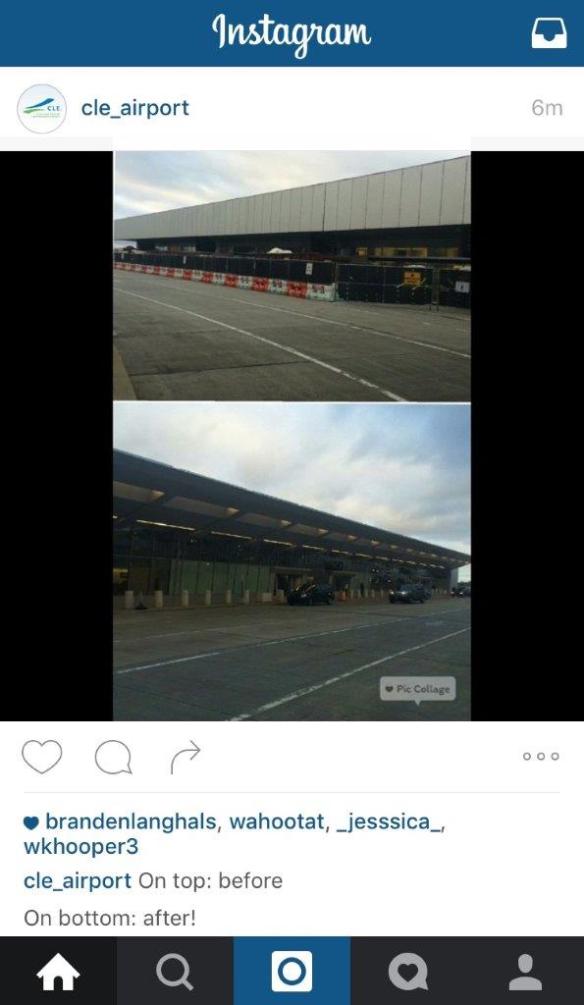
Additionally, the free AdWare “Pic Collage” logo is on the bottom right of the original post is large and visible and a bit distracting.
Take the time to lighten the picture before you post (can be done free with Instagram’s filters), the picture would have looked more open and friendlier – a clear improvement over the previous comparison picture.

Utilize the free filters as well as various sectional picture framing provided by Instagram’s latest app updates to allow for a cleaner post. On Instagram, photography must be clean because the attraction on this social media platform is visual.
Three important things on comparison photos:
- Make comparison photos undoubtedly clear on the improvement.
- Human perception associates brighter/more light as an improvement.
- Remove distracting free adware markers before posting to social media.
On Instagram, your photography skills are incredibly important because you are communicating a story to your audience with a picture.
Time is short, so Insta good stuff!
Or download the one-pager: Picture-comparison-posts-on-Instagram-Safety-PIO-SM-15-007
 Where is @rusnivek?